
System status display
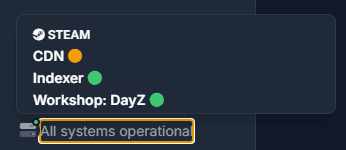
System status display is dependent on each agent individually. Depending on your region, specific entries might differ from agent to agent, particularly the status of CDN systems.
The manager contains an active indicator that displays the current system status of the Architect system, as well as attachment systems like Steam.

The small icon will be either green or yellow depending on the general status.
Clicking the indicator allows you to view the detailed system status.
Related Articles
Frequently asked questions
Common questions about connecting Manager to an Agent, console windows, OmegaManager migration, ports, RCon, and the cache directory.
Moving an Agent installation
Depending on requirement, you may not require to move the entire installation, it is possible to change the locations of the following directories:
Updating an Architect Agent
Update Architect Agent from Toolbox on Windows, or replace the binary manually when an automatic update is not available.